What Today’s Facebook Users Actually Respond To
Have you ever stopped to think about what your Facebook ads are competing with for people’s attention? It’s photos of people’s pets, their fun vacation trips, their life updates and funny videos. The things that catch people’s attention often look real, sometimes intimate or vulnerable, and authentically human.
When an ad interrupts that organic stream of content, it tends to stand out—and not in a good way.
If you’ve ever looked at your ads and worried they felt generic, identical to every other local business, or easy to scroll past, there’s a simple solution. And the good news is that you don’t need fancy lighting or videography skills. You just need a willingness to show potential clients who you really are.
If you want to grab people’s attention, you have to look like you belong in their feed. In this article, we’ll break down why real-life visuals outperform stock photos and how to start using them today with minimal time or tech skills.
Why Stock Photos Don’t Work Like They Used To
There’s nothing inherently wrong with stock photos. They’re quick, convenient, and available right inside Facebook’s ad builder. But over the last few years, people have learned to scroll past anything that looks too polished or too staged.
Authenticity has officially become the best “design style” in marketing. Here’s why:
People scroll past anything that “looks like an ad”
Facebook users see hundreds of ads every week. Their brain quickly filters out anything that feels too perfect—bright smiles, generic office scenes, or the same five models posing in different outfits.
According to a 2025 study on how users engage with sponsored content versus organic content, researchers found that participants were quick to recognize ads by elements like glossy visuals, CTA buttons, and brand logos.
Upon recognizing that the post they were looking at was an ad, participants in the study expressed distrust with the account; and once they realized the content wasn’t organic, many of them stopped engaging with it entirely.
Stock images feel fake or disconnected
Someone looking for a physical therapist, a dentist, a lawyer, or a tutor wants to know what you are like. They want to see your space, your team, your personality—not a family of models smiling at a salad bar.
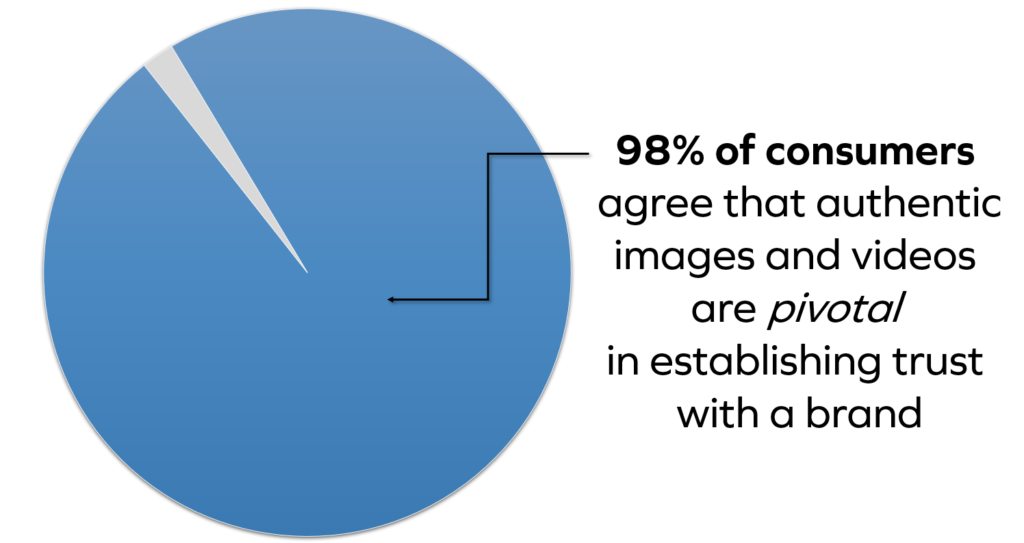
Don’t believe us? Well, according to Getty Images’ 2024 Building Trust in the Age of AI report, 98% of consumers agree that authentic images and videos are pivotal in establishing trust with a brand.
Real images feel personal, and that stops the scroll
When your ad looks like a real moment instead of a commercial, people pause. They read. They click. They respond. According to a 2019 survey, 90% of consumers said that authenticity is important when deciding which brands they like and support.
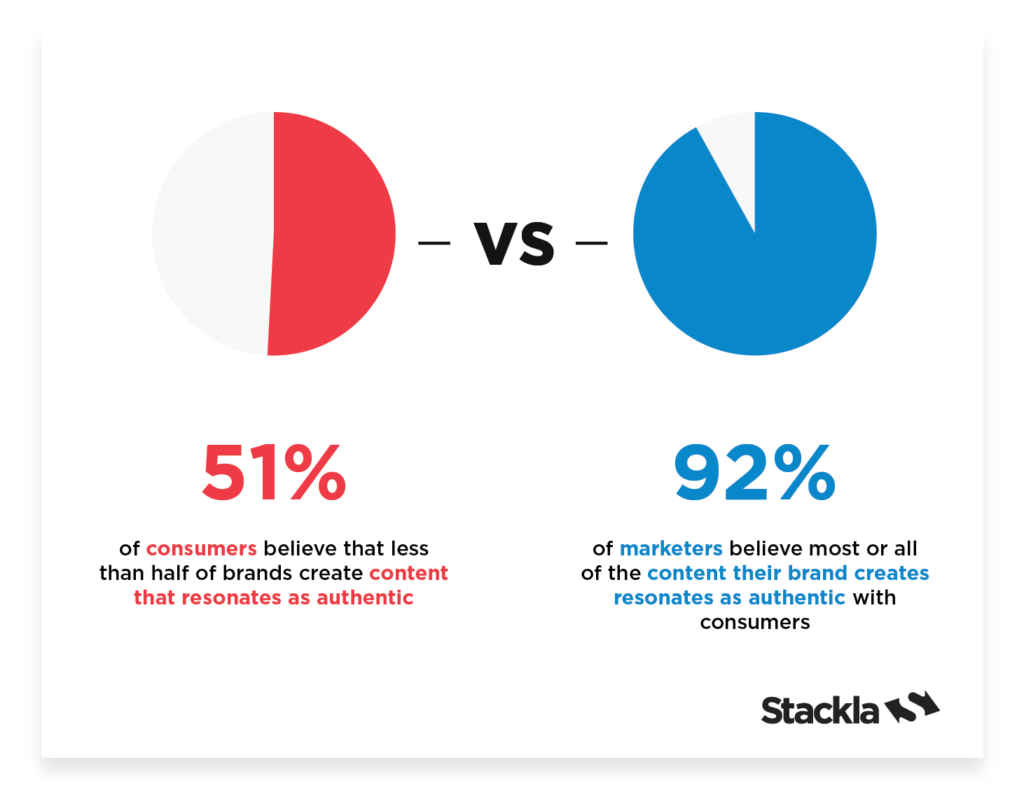
The same survey found that 92% of marketers consider a majority of their content comes off as authentic, but consumers disagree. In fact, 51% of consumers say that less than half of brands create authentic content online.
(Source: socialmediatoday.com)
What Counts as “Real-Life” Photos and Videos?
You don’t need pro-level photoshoots or a camera crew. Real-life content is simply anything that shows what your business actually looks like.
This includes:
- Photos of you, your staff, or your workspace
- Short DIY videos explaining a tip or showing what you do
- Happy customers or clients (with permission)
- Behind-the-scenes moments that show your daily operations
- Little slices of your business personality—the details that make you you
If you can take it with a smartphone, it counts.
Simple Real-Life Photo & Video Ideas for Your Facebook Ads
Once you start looking for everyday moments you can capture, you’ll realize you already have plenty to work with. Real-life visuals don’t require a staged backdrop or professional lighting. They simply need to show the people and environment that make your business feel familiar and trustworthy. If you’re thinking, “I never know what to take pictures of,” here are easy ideas any business can use.
Show the People Behind the Business
One of the easiest ways to make your ads more relatable is to feature the humans who make everything run. A friendly headshot of the owner, a quick photo of your team together, or even a simple “welcome” shot at the front desk all go a long way.
When people can see who they’ll be talking to or working with, it reduces uncertainty and builds comfort.
For example, MarketingExperiments reported that simply swapping a generic stock image with a real photo of the company’s founder increased form sign-ups by nearly 35% on the same page.
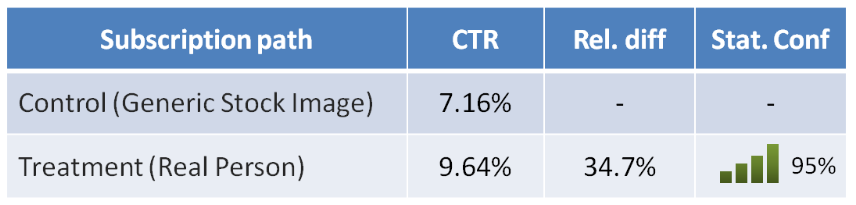
(Source: MarketingExperiments)
Capture Everyday Moments Around Your Workspace
You’d be surprised how interesting your day-to-day operations are to someone outside your field. Little moments from your workday are extremely effective ad tools because people love seeing how things work behind the curtain.
A photo of your workspace before opening, a team member getting ready for the day, or a glimpse of tools or equipment you use can all work beautifully in ads. These informal glimpses help viewers imagine what it’s like to step into your business.
Showcase Client Wins and Testimonials
Testimonials are powerful, but testimonials with a face are even better. When a client has a great experience, it’s often written all over their face. And these moments are gold for advertising because real stories outperform polished graphics almost every time.
Research from Wyzowl found that 9 out of 10 people trust what a customer says about a business more than what the business says about itself. And a staggering 95% of people say that reviews influence their purchasing decisions.
For your ads, you can use:
- A photo of a happy client with a short quote
- A selfie-style testimonial video
- A milestone moment photo (e.g., “I finally finished physical therapy!”)
Use Short Videos That Bring Your Business to Life
Video doesn’t need to be long or complicated to work well in Facebook ads. A 20–30 second tip recorded on your phone, a quick walkthrough of your office, or a short “meet our team” clip can make your business feel approachable. And these don’t need to be perfect. In fact, the more casual, the better.
Wyzowl’s 2024 study on video marketing found that 83% of consumers want to see more videos from brands online, which has remained fairly consistent year after year.
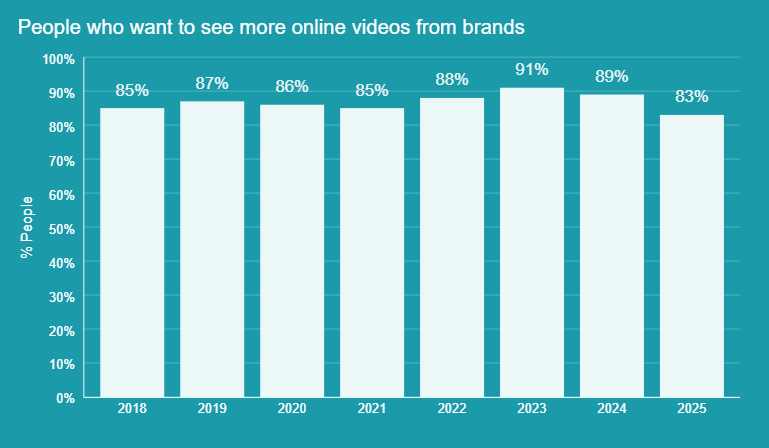
(Source: Wyzowl 2025 Report on Video Marketing Statistics)
How to Create a Simple Library of Real Photos and Videos
Building a useful library of photos and videos doesn’t require complicated systems or hours of planning. You simply need a small collection of authentic moments that reflect your business. Here’s how to build a small but mighty library you can use for months.
Look at What You Already Have
Before taking new photos, start by reviewing the ads and images you’ve already used online. Many businesses discover strong, usable visuals hidden in old posts, email newsletters, or their phone’s camera roll. While you’re looking, take note of what’s missing:
- Do you show your team?
- Is there a picture of your workspace?
- Do you have any testimonials?
- Is everything too “professional” and not enough “real”?
Make a Small “Shot List”
Instead of trying to film everything at once, make a short list of priority visuals. For most businesses, this includes:
- A few updated photos of you and your team
- A handful of shots around your workspace
- Two or three simple videos offering quick tips or explanations
- One or two testimonials (with permission)
Know When to DIY vs. Hire a Pro
You don’t have to choose between professional and DIY content — both serve different purposes. Everyday images, behind-the-scenes moments, and short videos are perfect for DIY because they feel natural and personal.
If you need something polished for your website’s homepage or a major branding piece, that’s when hiring a professional photographer or videographer pays off.
Take a Bunch at Once
A simple way to build your content library quickly is to batch your shooting. Set aside a short block of time (whether an hour a week or one morning a month) and capture several photos and videos in different spots.
Change angles, switch locations, and record a few clips back-to-back. One session can give you weeks of usable content. Batching saves time and gives you a full folder to choose from.
Keep Everything Organized
Create a few simple subfolders so you can find things quickly later. This doesn’t need to be fancy, it just needs enough structure to keep your growing library manageable. A good starter setup looks like this, with your main folder in bold and the subfolders listed afterward:
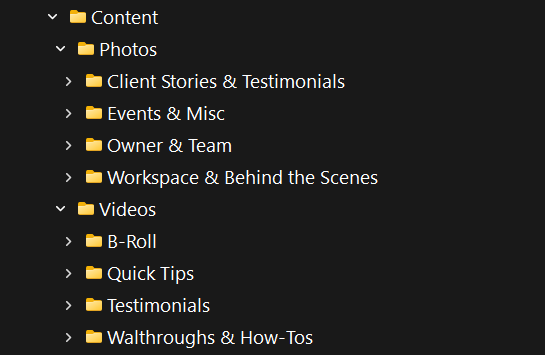
When you save a new photo or video, just drop it into the folder where it belongs. This way, your library stays tidy so you can locate things in seconds. This will help you start building variety so you can rotate through your ads without repeating the same visual too often.
How to Use Real-Life Content in Facebook Ads (Without the Tech Headache)
Once you’ve collected your photos and videos, using them in Facebook Ads Manager is easier than most business owners expect. The key is to choose visuals that match what you want your audience to do.
Match Your Photo or Video to What You Want People to Do
Different goals call for different types of visuals.
- Want brand awareness? Use a friendly intro photo or behind-the-scenes video.
- Want more leads? Use an owner photo with a clear offer.
- Want trust? Use a testimonial image or video.
Let the visual do most of the talking, because studies have shown that creative quality is one of the most important drivers for ROI when it comes to digital advertising.
Keep the Text Simple and Clear
Your visuals should do most of the heavy lifting, but ads still need copy to tell people what to do. Use plain, conversational wording that supports what people are seeing. You can follow a simple structure like this:
- Say what they’re seeing: “This is our team…”
- Share the benefit: “…and we’re here to help you finally feel better.”
- Tell them what to do next: “Book your visit today.”
Testing shows that using a specific, clear call-to-action can increase conversion rates by up to 161% compared to vague or generic language, and social media ads with clear CTAs have been found to generate up to 285% higher click-through rates than those with ambiguous prompts.
Try Two Versions and See What Works
A quick side-by-side comparison can show you how powerful real content is. Run two versions of the same ad — one using a stock photo and one using a real-life image — while keeping everything else identical. Facebook will automatically put more budget into the version that performs better.
Mistakes to Avoid When Taking Photos or Videos
Even simple visuals can fall flat if they’re handled poorly. The most common issues are easy to avoid:
- Shooting in low light, resulting in dark or blurry images. This can look great for personal or artistic photography; but for ads, it’s best to have brighter lighting.

(Photo by Craig Adderley on Pexels)
- Applying heavy filters that make the image look artificial

(Edited; original photo by Yan Krukau on Pexels)
- Filming or taking photos in cluttered, messy areas

(Photo by Andrea Piacquadio on Pexels)
- Moving the camera too much, especially for videos where your subject can become out of focus (or even out of frame).
(Video by Roman Odintsov on Pexels)
- Talking too quietly or filming in rooms with a distracting echo or background noise
Easy Ways to Tell If Your Real-Life Photos Are Working
Once you switch to authentic images, you should start seeing signs of improvement fairly quickly. Look at metrics like:
- How many people are clicking your ad
- Whether your cost per click is going down
- Whether you’re receiving more messages, leads, or calls
Compare results over a couple of weeks. Even modest improvements indicate that your audience is responding well to more natural, human visuals.
Need Help Using Photos and Videos in Your Facebook Ads?
Real images help people connect with your business in a more meaningful way. They make your ads feel genuine and personal, and they only take a handful of simple photos and videos to get started.
If the idea of planning, shooting, or organizing your visuals feels overwhelming, we can help.
Uplift Marketing works with small businesses and private practices every day to create high-performing Facebook ads that use real-life photos, real people, and real stories.
Give us a call at (314) 690-1575 or reach out through our Contact Us page. We’d love to help you bring your ads to life.
